Orphaned Attribute Cleanup
Detect and remove attribute sets that are no longer attached to any live object in the document.
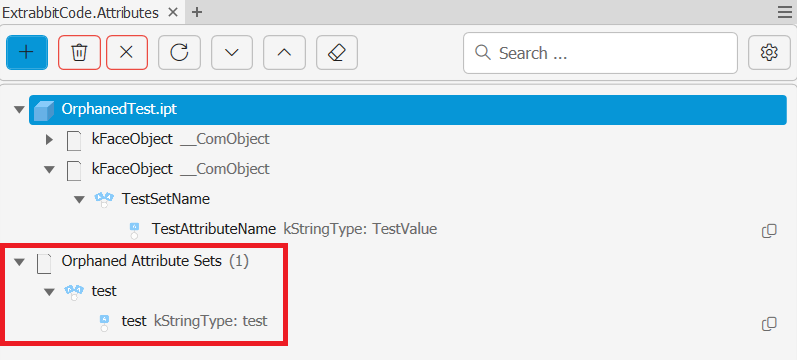
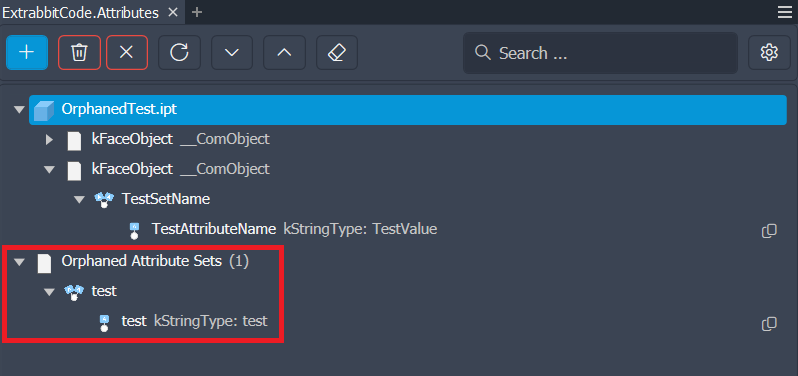
Over time, Inventor documents can accumulate orphaned attribute sets — sets that were created by scripts, macros, or previous workflows but are no longer attached to any live object. These sets are invisible in Inventor's UI but still exist in the file, adding clutter and file size.
The add-in can detect and purge these sets in one click.
What counts as orphaned
An attribute set is considered orphaned when the owner object it was attached to no longer exists in the document. This commonly happens when:
- An iLogic rule or VBA macro created attribute sets and then the component it targeted was deleted
- A design was restructured and some objects were removed without cleaning up their attributes
Running the cleanup
Open the Attribute Browser and use the Purge Orphaned Attribute Sets action in the toolbar. Orphaned attributes are listed in its own tree structure beneath the normal attribute nodes. After confirmation, they are removed.